
HTTP Injector
Screenshots
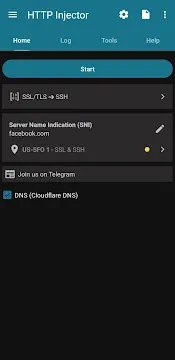
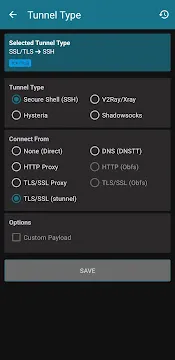
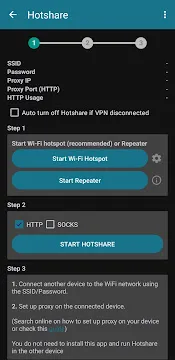

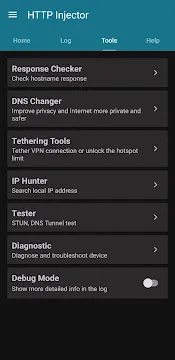
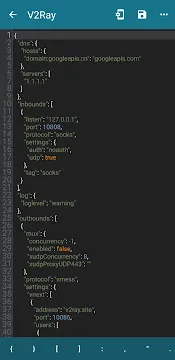
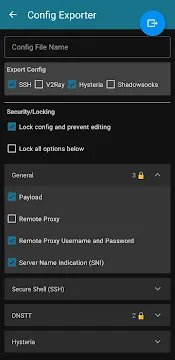
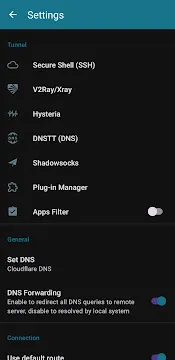
HTTP Injector (SSH/V2ray) VPN is a professional network tool designed to customize HTTP headers and secure internet connections. Users can modify request payloads to bypass secure digital firewalls. In addition, this tool encrypts your mobile data traffic using multiple tunneling protocols.
Consequently, you can access restricted websites and browse the internet completely privately. The application operates as a universal secure client that combines protocols like SSH and Shadowsocks. Therefore, security conscious individuals utilize this system to protect their private identities from malicious network trackers.
Understanding the Purpose of HTTP Injector (SSH/V2ray) VPN
Network restrictions often prevent users from accessing specific global websites and streaming services. Fortunately, HTTP Injector resolves this issue by establishing an encrypted path to a remote proxy server. As a result, network service providers cannot inspect your actual online activities or read your private text transmissions.
Moreover, this secure platform intercepts local connection headers to insert custom data structures. You can change your virtual location instantly to avoid local tracking systems. In other words, you regain complete control over your private web browsing data.
Why Users Choose This Secure Networking Tool
Public wireless networks frequently expose personal data to sniffer software and local hackers. However, this application guards your transmission parameters by creating a protective layer around every byte of information. Consequently, your sensitive banking data and personal logins remain completely unreadable to third parties.
In addition, many users prefer this system because it offers a highly customizable environment. Advanced configuration developers can export their special settings into encrypted files for the local community. Therefore, less experienced individuals can load these pre-made files to secure their connections instantly.
Key Features of HTTP Injector App For Android
This secure client includes multiple advanced utilities that support custom network configurations. Experienced specialists can access deep diagnostic menus to check connection speeds and identify localized server faults. Above all, the comprehensive layout provides total visibility into your active network tunnel parameters.
Furthermore, the application integrates multiple distinct proxy methods into a single, cohesive user interface. Users do not need separate applications to run different proxy rules simultaneously. To clarify, let us explore the core functionalities that define this security platform below.
Multi Protocol Tunneling Support
The core architecture provides seamless access to multiple secure tunneling methods. Users can connect through standard SSH tunnels or secure SSL methods. Meanwhile, advanced options like Hysteria and Wireguard offer faster response rates on unstable networks.
Moreover, the system accommodates V2Ray and Shadowsocks configurations natively. These protocols camouflage your data traffic to look like regular web browsing. Consequently, network firewalls cannot easily block your private data transfers.
Built In Payload Generator
Customizing connection parameters requires a reliable tool to write custom network headers. This internal generator simplifies the process by creating specific payload formats automatically. For instance, you can select normal request methods or direct split tunneling variants.
Then, the generator inserts chosen keywords and online host names into the data string. This feature removes the need to write complex text code manually. As a result, novice configuration makers can build valid setup files within minutes.
Integrated IP Hunter Tool
Certain networks require specific local IP address strings to establish a stable internet tunnel. This specialized hunting feature scans local subnets to find your target address automatically. Firstly, you enter your desired numeric pattern into the search field.
After that, the utility cycles your mobile radio signal to refresh the assigned internal IP. The search finishes immediately when the device matches your target sequence. Therefore, you save valuable time during complex manual connection configurations.
Advanced Provider Mode Encryption
Configuration creators often share their network profiles with large community groups or clients. However, developers must protect their private server logins and remote access keys from unauthorized viewing. This platform resolves the security risk by offering a robust file locking mechanism.
Subsequently, you can encrypt your exported files and set strict expiration dates. You can also attach a personalized text note for your end users. In short, this mode prevents packet sniffing and safeguards your technical assets completely.
Dynamic Diagnostic Host Checker
Troubleshooting a failing network tunnel requires a clear view of server responses. This built-in checking utility tests specified host links to reveal real-time HTTP response codes. For example, you can see if a server returns a successful status or a restricted block error.
Likewise, it confirms whether a connection requires a proxy server to succeed. This live feedback helps you pinpoint the exact source of config failures. Consequently, optimizing connection parameters becomes a straightforward task for everyone.
Custom DNS Changer Settings
Standard domain name servers often record user lookup requests and slow down browsing speeds. But this secure application lets you swap your default server address for high performance alternatives. You can choose reliable public options or input your personal addresses directly.
In other words, you bypass local DNS filtering systems that redirect web traffic. This adjustment significantly increases your privacy during daily web searches. Moreover, custom DNS servers frequently improve game connection response times.
How to Download and Install HTTP Injector APK
Acquiring this application package requires a straightforward process that completes in just a few moments. You must follow the precise instructions below to set up the software successfully. Most importantly, ensure your system settings permit external installation files before proceeding with the step by step list.
- Firstly, open your mobile web browser and locate the main repository link.
- Click the download button to start saving the application package file.
- Wait patiently while the system saves the installation data into your local storage folder.
- Then, navigate to your file manager and tap the newly saved file.
- Grant the required system permissions when the installation prompt appears on your screen.
- Finally, launch the app to begin configuring your private secure tunnel parameters.
HTTP Injector Advanced Tips and Tricks for Better Performance
- Save your device battery by enabling the data compression feature inside the main settings panel.
- Clear your activity logs regularly to prevent performance lag during long connection sessions.
- Use the built-in host checker tool to verify server availability before importing new config profiles.
- Always lock your configuration payload before sharing files to protect your private server credentials.
- Select closest geographic servers from the built-in list to maximize your data transmission speeds.
- Utilize the apps filter function to exclude trusted banking software from the secure proxy tunnel.
Conclusion
In conclusion, HTTP Injector provides a comprehensive solution for managing network privacy and bypassing structural firewalls. The advanced tool gives you total control over header parameters and custom tunneling protocols. Therefore, users who value digital autonomy consider this application an essential part of their mobile setup.
To sum up, the unique balance of payload generation and secure file encryption satisfies professional networking needs. You can safeguard your online presence and experience absolute browsing freedom without complex hardware configurations. Start utilizing this secure client today to elevate your private network management.